ViewX is LIVE on Kickstarter View On Kickstarter
SuperDepth3D Parameter Settings

For detailed download instructions, please refer to our [Software Setup Guide – ReShade + SuperDepth3D].
SuperDepth3D provides a range of parameters for adjusting the spatial depth, foreground/background layering, and left-eye/right-eye image display in games.
When adjusting the settings, we recommend focusing on the two core parameters first: Depth Adjustment and Zero Parallax Distance.
1. Depth Adjustment
Depth Adjustment is one of the most important parameters for controlling the overall 3D effect. It determines the intensity of the depth mapping between objects at different distances.
A higher value creates a stronger sense of depth and spatial immersion, making the separation between foreground and background more pronounced.
2. Zero Parallax Distance (ZPD)
Zero Parallax Distance (ZPD) defines the reference plane of the 3D scene and can be thought of as the visual anchor point of the image.
Objects positioned relative to this plane can appear to extend out of the screen or recede into the screen.
Increasing the ZPD can make the overall pop-out effect more noticeable.
After adjusting these two core parameters, you can further optimize the image using Smart Convergence and Halo Reduction.
Smart Convergence
Smart Convergence automatically adjusts the convergence point of the left- and right-eye images. It can be used to fine-tune the ZPD and help reduce crosstalk caused by misalignment between the two eye views.
Halo Reduction
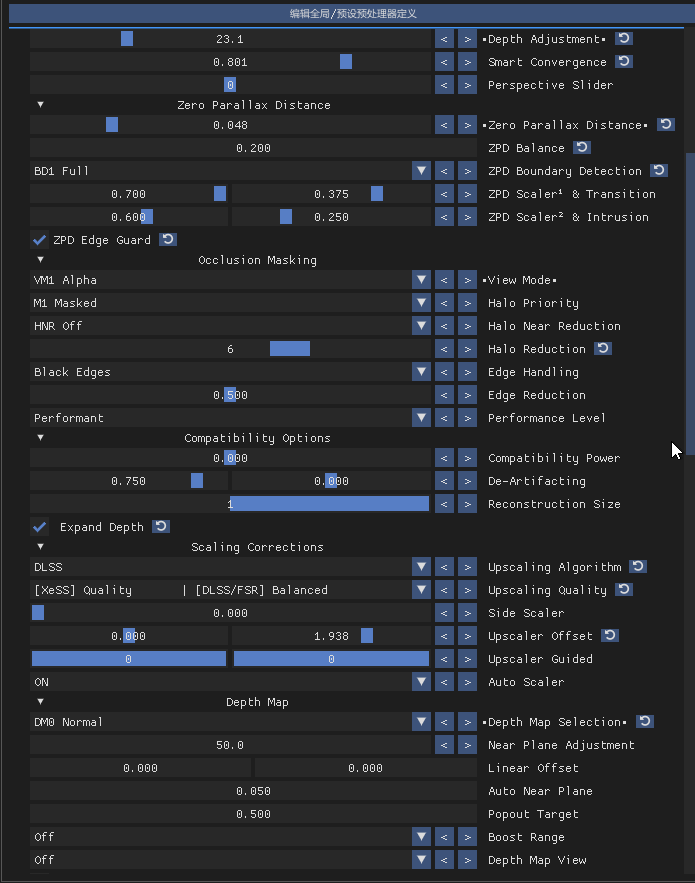
Halo Reduction helps suppress halo artifacts around objects in the 3D image. A setting of around 5–7 is generally recommended, providing a good balance between reducing halos while preserving image clarity and detail.
Example: Hogwarts Legacy
Next, we’ll use Hogwarts Legacy as an example to demonstrate a practical SuperDepth3D configuration.
The remaining parameters can be left at their default values, or fine-tuned according to your personal preference and display conditions.
Recommended Settings:
- Depth Adjustment: 23.1
- Zero Parallax Distance: 0.048